My Mac mini M6 with 32 GB arrived. I gave myself one day, with Claude Code doing the typing, to move all scheduled jobs off the MacBook.
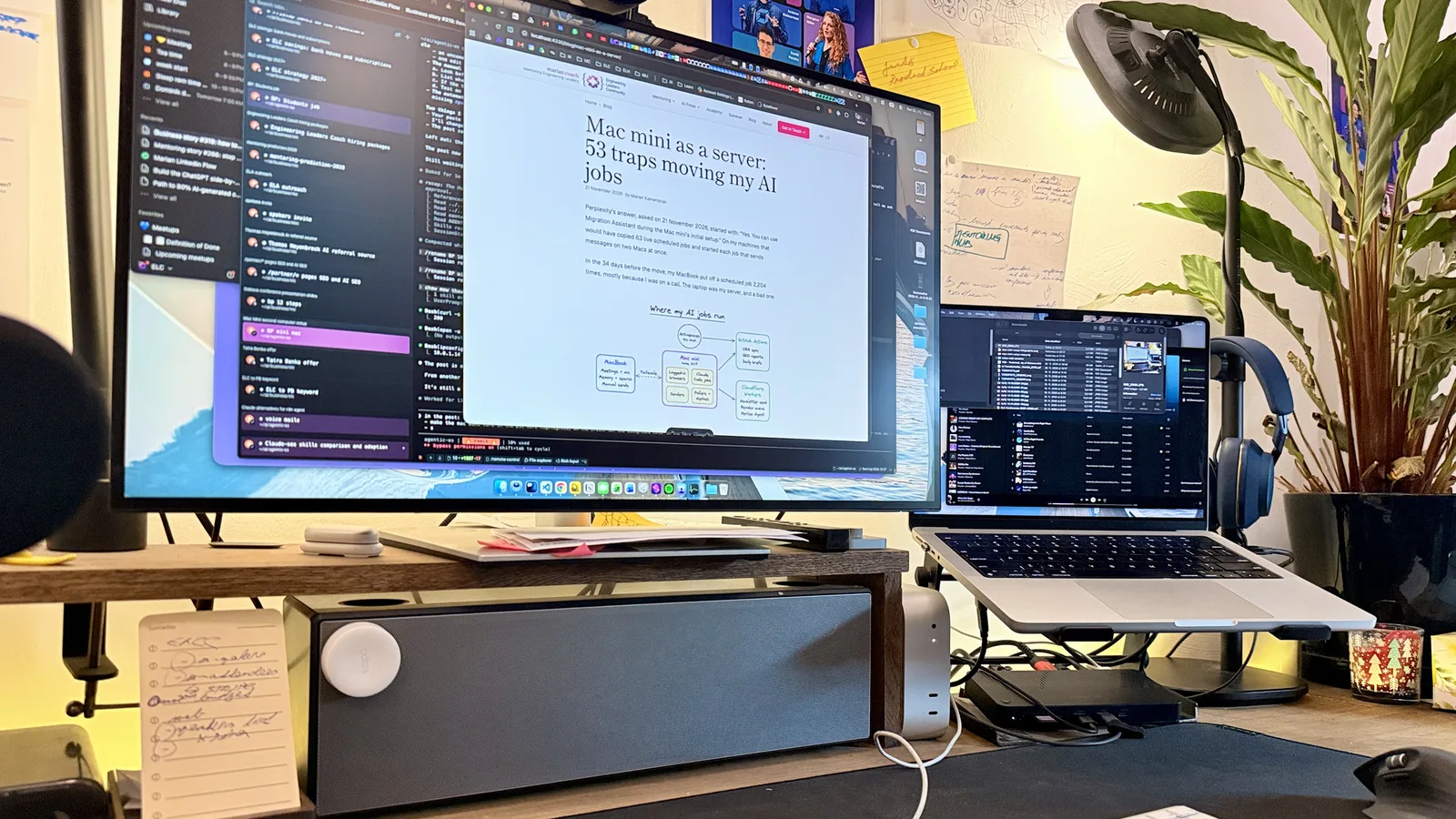
By the evening I had logged 53 wrong assumptions, mine and Claude’s. 33 of them apply to any Mac and are in the public repo, next to the runbook and the scripts. That list has grown to 37 since. The other 20 were about my own jobs. The 14 that hurt most are below.
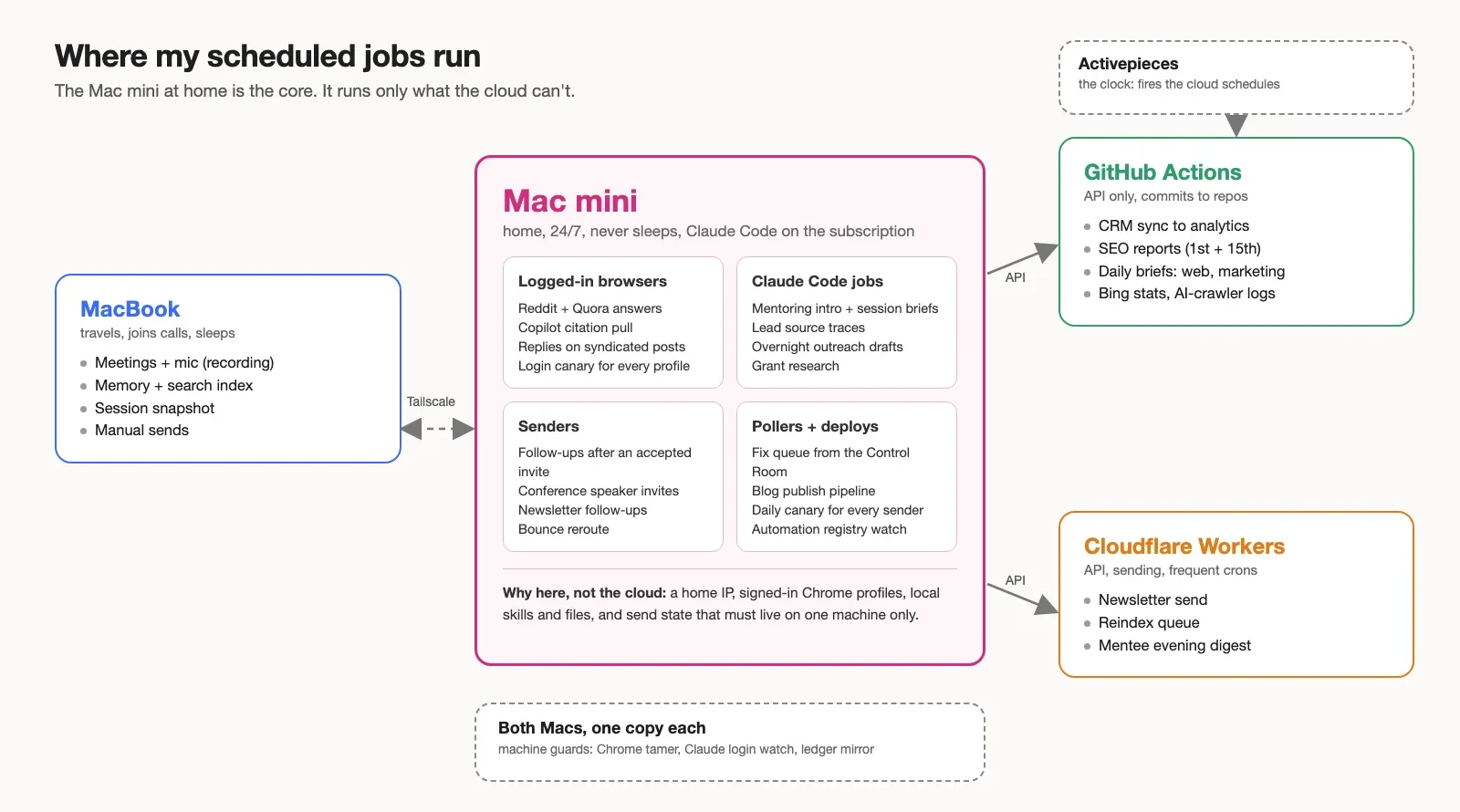
The rule I ended the day with: cloud first, the Mac mini only for what the cloud can’t run, and one job on one machine.
My laptop was my server, and it kept saying no
“My local notebook is freezing sometimes.” I wrote that to Claude on 17 November, four days before the mini arrived.
I run a one-person business with scheduled AI jobs around it: a brief before each mentoring call, lead source traces, blog publishing, follow-up messages, SEO reports. The bigger picture is in how my AI executive assistant works. Until this week all of it ran on the MacBook I use for video calls.
The jobs run through a wrapper I call safe-run. Before a job starts, it checks if I’m on a call, if the laptop is on battery, if memory is low. If yes, the job waits and safe-run asks again 10 minutes later. Good for my calls, bad for the jobs. Some runs waited out their limit and were dropped.
Its log from 18 October to 21 November 2026:
| What happened | Count |
|---|---|
| A job had to wait | 432 times |
| Longest wait | 6 hours, on 5 November. Then the run was dropped |
| Runs dropped after waiting | 73 (30 on calls, 43 on battery at night) |
| “Not yet” answers in total, one per 10-minute check | 2,204 |
| Not yet, I was on a call | 1,581 |
| Not yet, laptop on battery | 581 |
| Not yet, memory low | 41 |
| Not yet, no internet | 1 |
| Killed in the middle by the memory guard | 127 runs (33 jobs) |
Show the numbers as a table
| Day | On a call | On battery | Memory low |
|---|---|---|---|
| 18 Oct | 0 | 0 | 4 |
| 19 Oct | 48 | 0 | 0 |
| 20 Oct | 27 | 0 | 2 |
| 21 Oct | 101 | 0 | 0 |
| 22 Oct | 127 | 0 | 2 |
| 23 Oct | 65 | 56 | 0 |
| 24 Oct | 0 | 23 | 2 |
| 25 Oct | 0 | 9 | 2 |
| 26 Oct | 87 | 4 | 0 |
| 27 Oct | 58 | 0 | 0 |
| 28 Oct | 27 | 0 | 3 |
| 29 Oct | 0 | 0 | 0 |
| 30 Oct | 0 | 0 | 0 |
| 31 Oct | 0 | 0 | 0 |
| 1 Nov | 0 | 0 | 4 |
| 2 Nov | 13 | 28 | 7 |
| 3 Nov | 98 | 12 | 1 |
| 4 Nov | 192 | 100 | 0 |
| 5 Nov | 225 | 104 | 1 |
| 6 Nov | 0 | 15 | 0 |
| 7 Nov | 0 | 21 | 0 |
| 8 Nov | 0 | 85 | 0 |
| 9 Nov | 17 | 0 | 0 |
| 10 Nov | 173 | 0 | 1 |
| 11 Nov | 21 | 0 | 1 |
| 12 Nov | 129 | 0 | 0 |
| 13 Nov | 68 | 0 | 0 |
| 14 Nov | 0 | 0 | 2 |
| 15 Nov | 0 | 0 | 0 |
| 16 Nov | 58 | 19 | 1 |
| 17 Nov | 18 | 24 | 1 |
| 18 Nov | 16 | 46 | 1 |
| 19 Nov | 0 | 0 | 6 |
| 20 Nov | 13 | 10 | 0 |
| 21 Nov | 0 | 25 | 0 |
Show the numbers as a table
| 00:00 | 01:00 | 02:00 | 03:00 | 04:00 | 05:00 | 06:00 | 07:00 | 08:00 | 09:00 | 10:00 | 11:00 | 12:00 | 13:00 | 14:00 | 15:00 | 16:00 | 17:00 | 18:00 | 19:00 | 20:00 | 21:00 | 22:00 | 23:00 | |
|---|---|---|---|---|---|---|---|---|---|---|---|---|---|---|---|---|---|---|---|---|---|---|---|---|
| Mon | 0 | 0 | 1 | 0 | 0 | 0 | 0 | 0 | 10 | 20 | 26 | 39 | 50 | 23 | 10 | 25 | 27 | 8 | 21 | 4 | 13 | 4 | 1 | 0 |
| Tue | 0 | 0 | 0 | 0 | 0 | 2 | 5 | 3 | 36 | 66 | 30 | 24 | 45 | 14 | 46 | 30 | 30 | 48 | 33 | 0 | 0 | 3 | 0 | 0 |
| Wed | 0 | 0 | 2 | 1 | 5 | 2 | 5 | 1 | 29 | 66 | 67 | 96 | 30 | 69 | 17 | 10 | 0 | 38 | 33 | 33 | 4 | 0 | 0 | 0 |
| Thu | 0 | 0 | 1 | 1 | 0 | 4 | 0 | 0 | 24 | 48 | 42 | 58 | 44 | 67 | 91 | 105 | 80 | 27 | 0 | 0 | 0 | 0 | 2 | 0 |
| Fri | 0 | 0 | 1 | 2 | 6 | 5 | 0 | 19 | 12 | 22 | 29 | 28 | 13 | 35 | 14 | 14 | 21 | 6 | 0 | 0 | 0 | 0 | 0 | 0 |
| Sat | 0 | 0 | 1 | 0 | 5 | 3 | 0 | 3 | 11 | 9 | 6 | 0 | 0 | 1 | 0 | 2 | 5 | 8 | 6 | 10 | 1 | 0 | 2 | 1 |
| Sun | 1 | 0 | 3 | 0 | 0 | 0 | 1 | 1 | 7 | 0 | 2 | 33 | 36 | 14 | 0 | 0 | 0 | 0 | 4 | 0 | 0 | 0 | 2 | 0 |
The memory side looked like this:
Not all of that memory was the jobs. On day two I counted 24 open Claude sessions on the same laptop, and I can’t split the swap between the two.
My Control Room dashboard showed it from the other side: in 25 days it recorded 495 runs that ended as “Mac asleep, offline or busy”. On 17 November the overnight job that writes my outreach drafts crashed at 05:03 on a network timeout. The lid was closed.
The Mac mini is where the leftovers go
Why a Mac mini AI server and not a Linux box? My jobs are launchd jobs, my browser profiles are macOS Chrome profiles, and my Claude Code skills expect the same paths as on the laptop. A second Mac meant zero rewrites.
Most Mac mini posts I read before buying start from the box: I Run 25 Automated Agents on a Mac Mini, or an M6 turned into an agent server that runs around the clock. They’re right that a mini is cheap, quiet and fast. Where I disagree: they put the whole stack on it. A Mac at home is one power cut, one macOS restart or one Wi-Fi drop away from stopping all of it.
So I sorted the jobs before I moved one. A job runs where its data and its login live. Anything that only calls an API goes to the cloud.
| Where | What runs there | My jobs, for example |
|---|---|---|
| MacBook | Where I work | Meetings + mic, Memory + search, Manual sends |
| Mac mini | What the cloud can’t run | Logged-in browsers, Claude Code jobs, Senders, Pollers + deploys |
| Cloudflare Workers | APIs, sending, frequent crons | Newsletter send, Reindex queue, Mentee digest |
| GitHub Actions | Batches on APIs, work that commits to a repo | CRM sync, SEO reports, Daily briefs |
| Activepieces | the clock | Fires the GitHub Actions schedules on time |
Show the numbers as a table
| Where it runs | Active jobs |
|---|---|
| Mac mini | 47 |
| MacBook | 9 |
| GitHub Actions | 8 |
| Cloudflare Workers | 3 |
| Both Macs, one copy each | 3 |
Claude routines are the sixth place, for LLM judgment with both Macs off. I run 0 jobs there today. They’re the next stop for the Claude Code jobs that don’t need my files.
Sort your own jobs with five questions
One check before the questions: if a job keeps “already sent” state on disk, it stays where that state is until you move the state.
Then ask in this order, per job. The first yes decides.
- Does it need my mic, my screen or data made on my laptop? MacBook.
- Does it need a signed-in browser, a home IP or Claude Code on local files? Mac mini.
- Is it a short API call, a send or a frequent cron? Cloudflare Worker.
- Is it a longer batch over APIs or a repo, or does it commit back? GitHub Actions.
- Does it need LLM judgment but no local files? A Claude routine.
What my sort gave
Before the move, 70 jobs were tied to the Mac: 63 LaunchAgents plus the jobs of my Claude cron daemon.
| Verdict | Jobs |
|---|---|
| Move to the Mac mini | 29 |
| Has a cloud copy, the Mac version runs until the copy passes | 17 |
| Merged into another job | 8 |
| Stay on the MacBook | 7 |
| Retired | 6 |
| Still open | 3 |
The rule says 29 jobs belong on the mini. Tonight it runs 47. The 18 extra are from the “cloud copy” row and the open ones: their Mac version keeps running until the cloud copy passes testing. 5 of them are senders, and their “already sent” memory still lives on the mini’s disk.
How much work moved? The safe-run log records how long each run took. Over the 34 days, the MacBook spent 207.9 hours running jobs. CPU and RAM per job weren’t logged, so run time is the best measure I have.
- Moved to the Mac mini109.2 h · 53%
- Cloud, both Macs, merged, retired74.7 h · 36%
- Stays on the MacBook24.0 h · 12%
Show the numbers as a table
| Where the job runs now | Run time on the MacBook | Share |
|---|---|---|
| Moved to the Mac mini | 109.2 h | 53% |
| Cloud, both Macs, merged, retired | 74.7 h | 36% |
| Stays on the MacBook | 24.0 h | 12% |
The jobs that took the most laptop time went to the mini:
Show the numbers as a table
| Job | Run time on the MacBook |
|---|---|
| Call follow-up drafts | 22.9 h |
| Post-draft click handler | 15.9 h |
| Partner lead list | 12.2 h |
| Overnight outreach drafts | 10.0 h |
| Sender canaries | 6.9 h |
| Work-email finder | 5.7 h |
| Intro-call briefs | 5.5 h |
| Browser follow-up sender | 4.1 h |
| Community answers | 4.1 h |
Run count and run length tell different stories. The pollers ran hundreds of times for under a minute each, the list builders and draft writers a few dozen times for half an hour:
Show the numbers as a table
| Point | Group | Runs in 34 days (log scale) | Minutes per run |
|---|---|---|---|
| Moved to the Mac mini job: 4 runs, 0.1 min each on average | Moved to the Mac mini | 4 | 0.1 |
| Moved to the Mac mini job: 22 runs, 1.7 min each on average | Moved to the Mac mini | 22 | 1.7 |
| Browser follow-up sender: 177 runs, 1.4 min each on average | Moved to the Mac mini | 177 | 1.4 |
| Cloud, both Macs, merged, retired job: 1 runs, 0.7 min each on average | Cloud, both Macs, merged, retired | 1 | 0.7 |
| Moved to the Mac mini job: 14 runs, 2.9 min each on average | Moved to the Mac mini | 14 | 2.9 |
| Moved to the Mac mini job: 9 runs, 2.1 min each on average | Moved to the Mac mini | 9 | 2.1 |
| Cloud, both Macs, merged, retired job: 20 runs, 3.1 min each on average | Cloud, both Macs, merged, retired | 20 | 3.1 |
| Moved to the Mac mini job: 12 runs, 3.1 min each on average | Moved to the Mac mini | 12 | 3.1 |
| Moved to the Mac mini job: 6 runs, 22.2 min each on average | Moved to the Mac mini | 6 | 22.2 |
| Cloud, both Macs, merged, retired job: 97 runs, 5.3 min each on average | Cloud, both Macs, merged, retired | 97 | 5.3 |
| Cloud, both Macs, merged, retired job: 2 runs, 0.1 min each on average | Cloud, both Macs, merged, retired | 2 | 0.1 |
| Cloud, both Macs, merged, retired job: 32 runs, 11.7 min each on average | Cloud, both Macs, merged, retired | 32 | 11.7 |
| Cloud, both Macs, merged, retired job: 1 runs, 3.4 min each on average | Cloud, both Macs, merged, retired | 1 | 3.4 |
| Cloud, both Macs, merged, retired job: 5 runs, 9.1 min each on average | Cloud, both Macs, merged, retired | 5 | 9.1 |
| Moved to the Mac mini job: 6 runs, 8 min each on average | Moved to the Mac mini | 6 | 8 |
| Overnight outreach drafts: 20 runs, 29.9 min each on average | Moved to the Mac mini | 20 | 29.9 |
| Moved to the Mac mini job: 20 runs, 1.5 min each on average | Moved to the Mac mini | 20 | 1.5 |
| Cloud, both Macs, merged, retired job: 26 runs, 0.7 min each on average | Cloud, both Macs, merged, retired | 26 | 0.7 |
| Cloud, both Macs, merged, retired job: 1 runs, 0.1 min each on average | Cloud, both Macs, merged, retired | 1 | 0.1 |
| Moved to the Mac mini job: 7 runs, 0.2 min each on average | Moved to the Mac mini | 7 | 0.2 |
| Cloud, both Macs, merged, retired job: 2 runs, 0 min each on average | Cloud, both Macs, merged, retired | 2 | 0 |
| Cloud, both Macs, merged, retired job: 1 runs, 4.1 min each on average | Cloud, both Macs, merged, retired | 1 | 4.1 |
| Cloud, both Macs, merged, retired job: 1 runs, 0.1 min each on average | Cloud, both Macs, merged, retired | 1 | 0.1 |
| Moved to the Mac mini job: 2 runs, 0.5 min each on average | Moved to the Mac mini | 2 | 0.5 |
| Cloud, both Macs, merged, retired job: 1 runs, 0 min each on average | Cloud, both Macs, merged, retired | 1 | 0 |
| Moved to the Mac mini job: 8 runs, 0.2 min each on average | Moved to the Mac mini | 8 | 0.2 |
| Cloud, both Macs, merged, retired job: 8 runs, 0.4 min each on average | Cloud, both Macs, merged, retired | 8 | 0.4 |
| Moved to the Mac mini job: 6 runs, 2.4 min each on average | Moved to the Mac mini | 6 | 2.4 |
| Cloud, both Macs, merged, retired job: 2 runs, 0.2 min each on average | Cloud, both Macs, merged, retired | 2 | 0.2 |
| Cloud, both Macs, merged, retired job: 30 runs, 13.5 min each on average | Cloud, both Macs, merged, retired | 30 | 13.5 |
| Cloud, both Macs, merged, retired job: 3 runs, 3.3 min each on average | Cloud, both Macs, merged, retired | 3 | 3.3 |
| Moved to the Mac mini job: 16 runs, 4.6 min each on average | Moved to the Mac mini | 16 | 4.6 |
| Moved to the Mac mini job: 3 runs, 2.5 min each on average | Moved to the Mac mini | 3 | 2.5 |
| Moved to the Mac mini job: 7 runs, 1.4 min each on average | Moved to the Mac mini | 7 | 1.4 |
| Cloud, both Macs, merged, retired job: 1 runs, 1.7 min each on average | Cloud, both Macs, merged, retired | 1 | 1.7 |
| Cloud, both Macs, merged, retired job: 1 runs, 11.1 min each on average | Cloud, both Macs, merged, retired | 1 | 11.1 |
| Cloud, both Macs, merged, retired job: 1 runs, 0.3 min each on average | Cloud, both Macs, merged, retired | 1 | 0.3 |
| Cloud, both Macs, merged, retired job: 14 runs, 1.6 min each on average | Cloud, both Macs, merged, retired | 14 | 1.6 |
| Cloud, both Macs, merged, retired job: 764 runs, 1.2 min each on average | Cloud, both Macs, merged, retired | 764 | 1.2 |
| Stays on the MacBook job: 18 runs, 1.3 min each on average | Stays on the MacBook | 18 | 1.3 |
| Cloud, both Macs, merged, retired job: 33 runs, 3.6 min each on average | Cloud, both Macs, merged, retired | 33 | 3.6 |
| Cloud, both Macs, merged, retired job: 2 runs, 0.2 min each on average | Cloud, both Macs, merged, retired | 2 | 0.2 |
| Cloud, both Macs, merged, retired job: 1 runs, 2.2 min each on average | Cloud, both Macs, merged, retired | 1 | 2.2 |
| Moved to the Mac mini job: 1 runs, 1.3 min each on average | Moved to the Mac mini | 1 | 1.3 |
| Moved to the Mac mini job: 3 runs, 22.7 min each on average | Moved to the Mac mini | 3 | 22.7 |
| Cloud, both Macs, merged, retired job: 6 runs, 0.3 min each on average | Cloud, both Macs, merged, retired | 6 | 0.3 |
| Moved to the Mac mini job: 8 runs, 0.2 min each on average | Moved to the Mac mini | 8 | 0.2 |
| Cloud, both Macs, merged, retired job: 3 runs, 13.5 min each on average | Cloud, both Macs, merged, retired | 3 | 13.5 |
| Moved to the Mac mini job: 52 runs, 2.4 min each on average | Moved to the Mac mini | 52 | 2.4 |
| Cloud, both Macs, merged, retired job: 22 runs, 2.8 min each on average | Cloud, both Macs, merged, retired | 22 | 2.8 |
| Moved to the Mac mini job: 27 runs, 5.2 min each on average | Moved to the Mac mini | 27 | 5.2 |
| Moved to the Mac mini job: 19 runs, 3.1 min each on average | Moved to the Mac mini | 19 | 3.1 |
| Call follow-up drafts: 1,526 runs, 0.9 min each on average | Moved to the Mac mini | 1526 | 0.9 |
| Moved to the Mac mini job: 4 runs, 0.3 min each on average | Moved to the Mac mini | 4 | 0.3 |
| Moved to the Mac mini job: 17 runs, 5.9 min each on average | Moved to the Mac mini | 17 | 5.9 |
| Partner lead list: 22 runs, 33.1 min each on average | Moved to the Mac mini | 22 | 33.1 |
| Cloud, both Macs, merged, retired job: 1,883 runs, 0.3 min each on average | Cloud, both Macs, merged, retired | 1883 | 0.3 |
| Cloud, both Macs, merged, retired job: 1 runs, 0 min each on average | Cloud, both Macs, merged, retired | 1 | 0 |
| Stays on the MacBook job: 24 runs, 39.3 min each on average | Stays on the MacBook | 24 | 39.3 |
| Cloud, both Macs, merged, retired job: 1 runs, 1.8 min each on average | Cloud, both Macs, merged, retired | 1 | 1.8 |
| Moved to the Mac mini job: 3 runs, 0.5 min each on average | Moved to the Mac mini | 3 | 0.5 |
| Cloud, both Macs, merged, retired job: 1 runs, 1.3 min each on average | Cloud, both Macs, merged, retired | 1 | 1.3 |
| Cloud, both Macs, merged, retired job: 6 runs, 1 min each on average | Cloud, both Macs, merged, retired | 6 | 1 |
| Moved to the Mac mini job: 5 runs, 10.4 min each on average | Moved to the Mac mini | 5 | 10.4 |
| Cloud, both Macs, merged, retired job: 3 runs, 0.5 min each on average | Cloud, both Macs, merged, retired | 3 | 0.5 |
| Cloud, both Macs, merged, retired job: 5 runs, 0.1 min each on average | Cloud, both Macs, merged, retired | 5 | 0.1 |
| Work-email finder: 19 runs, 17.9 min each on average | Moved to the Mac mini | 19 | 17.9 |
| Community answers: 23 runs, 10.7 min each on average | Moved to the Mac mini | 23 | 10.7 |
| Moved to the Mac mini job: 8 runs, 0.2 min each on average | Moved to the Mac mini | 8 | 0.2 |
| Cloud, both Macs, merged, retired job: 25 runs, 3.1 min each on average | Cloud, both Macs, merged, retired | 25 | 3.1 |
| Moved to the Mac mini job: 14 runs, 2.8 min each on average | Moved to the Mac mini | 14 | 2.8 |
| Sender canaries: 95 runs, 4.4 min each on average | Moved to the Mac mini | 95 | 4.4 |
| Cloud, both Macs, merged, retired job: 19 runs, 1.5 min each on average | Cloud, both Macs, merged, retired | 19 | 1.5 |
| Cloud, both Macs, merged, retired job: 13 runs, 3.1 min each on average | Cloud, both Macs, merged, retired | 13 | 3.1 |
| Post-draft click handler: 1,042 runs, 0.9 min each on average | Moved to the Mac mini | 1042 | 0.9 |
| Moved to the Mac mini job: 3 runs, 0.5 min each on average | Moved to the Mac mini | 3 | 0.5 |
| Moved to the Mac mini job: 5 runs, 0.2 min each on average | Moved to the Mac mini | 5 | 0.2 |
| Cloud, both Macs, merged, retired job: 7 runs, 0.1 min each on average | Cloud, both Macs, merged, retired | 7 | 0.1 |
| Intro-call briefs: 27 runs, 12.1 min each on average | Moved to the Mac mini | 27 | 12.1 |
| Cloud, both Macs, merged, retired job: 1 runs, 0.1 min each on average | Cloud, both Macs, merged, retired | 1 | 0.1 |
| Cloud, both Macs, merged, retired job: 1 runs, 0.2 min each on average | Cloud, both Macs, merged, retired | 1 | 0.2 |
| Moved to the Mac mini job: 68 runs, 1.6 min each on average | Moved to the Mac mini | 68 | 1.6 |
| Moved to the Mac mini job: 19 runs, 3.3 min each on average | Moved to the Mac mini | 19 | 3.3 |
| Cloud, both Macs, merged, retired job: 13 runs, 8.8 min each on average | Cloud, both Macs, merged, retired | 13 | 8.8 |
| Cloud, both Macs, merged, retired job: 10 runs, 0 min each on average | Cloud, both Macs, merged, retired | 10 | 0 |
| Cloud, both Macs, merged, retired job: 6 runs, 2.4 min each on average | Cloud, both Macs, merged, retired | 6 | 2.4 |
| Cloud, both Macs, merged, retired job: 17 runs, 2.1 min each on average | Cloud, both Macs, merged, retired | 17 | 2.1 |
| Cloud, both Macs, merged, retired job: 6 runs, 1.2 min each on average | Cloud, both Macs, merged, retired | 6 | 1.2 |
| Moved to the Mac mini job: 19 runs, 3.6 min each on average | Moved to the Mac mini | 19 | 3.6 |
| Cloud, both Macs, merged, retired job: 3 runs, 0.9 min each on average | Cloud, both Macs, merged, retired | 3 | 0.9 |
| Cloud, both Macs, merged, retired job: 1 runs, 0 min each on average | Cloud, both Macs, merged, retired | 1 | 0 |
| Stays on the MacBook job: 2 runs, 0.9 min each on average | Stays on the MacBook | 2 | 0.9 |
| Moved to the Mac mini job: 5 runs, 2.1 min each on average | Moved to the Mac mini | 5 | 2.1 |
| Cloud, both Macs, merged, retired job: 4 runs, 0 min each on average | Cloud, both Macs, merged, retired | 4 | 0 |
| Stays on the MacBook job: 615 runs, 0.8 min each on average | Stays on the MacBook | 615 | 0.8 |
| Cloud, both Macs, merged, retired job: 1 runs, 0 min each on average | Cloud, both Macs, merged, retired | 1 | 0 |
| Cloud, both Macs, merged, retired job: 3 runs, 1.4 min each on average | Cloud, both Macs, merged, retired | 3 | 1.4 |
| Cloud, both Macs, merged, retired job: 3 runs, 2.5 min each on average | Cloud, both Macs, merged, retired | 3 | 2.5 |
| Moved to the Mac mini job: 11 runs, 3.9 min each on average | Moved to the Mac mini | 11 | 3.9 |
| Moved to the Mac mini job: 3 runs, 0.7 min each on average | Moved to the Mac mini | 3 | 0.7 |
| Cloud, both Macs, merged, retired job: 5 runs, 1 min each on average | Cloud, both Macs, merged, retired | 5 | 1 |
| Cloud, both Macs, merged, retired job: 7 runs, 1.5 min each on average | Cloud, both Macs, merged, retired | 7 | 1.5 |
Move the state, and the job can move
Double sends are a state problem, not a machine problem. When the “already sent” ledger lives in a shared store with a key per message, a job can run on any machine, a restored backup or a cloned repo, and still send once. Mine still lives in gitignored files, so the senders are the last jobs to leave the box.
For a team the same sort works. The home box becomes an office Mac, a hosted Mac or a self-hosted runner. The jobs with no clean cloud home are the same two: logged-in browsers and the subscription CLI on local files.
My jobs by business stream
Mentoring. Mac mini: intro-call briefs, session briefs and notes, the overnight session knowledge base, newsletter follow-ups, replies on syndicated posts, lead source traces. Cloud: the mentee evening digest and the newsletter send on Workers.
ELC community. Mac mini: logged-in browser jobs that send follow-ups, bounce reroute, reply watch, overnight outreach drafts, the work-email finder, the partner lead list, grant research. MacBook: manual sends and grant follow-ups.
ELC Conference. Mac mini: speaker invites from a logged-in browser.
Platform and SEO. Mac mini: Reddit and Quora answers, the Copilot citation pull, the login check for browser profiles, blog publishing, the fix queue, canaries for the senders. GitHub Actions: CRM sync to analytics, SEO reports, Bing stats, AI-crawler logs, a pipeline health check, the daily web brief. Workers: the reindex queue. Both Macs: the Chrome cleaner, the Claude login watch, the ledger mirror.
Personal ops. Mac mini: LinkedIn post drafts from yesterday’s work, call follow-up drafts. GitHub Actions: the marketing board, daily and weekly. MacBook: meeting recordings, the memory jobs, the search index, the session snapshot.
Skip Migration Assistant on a server Mac
I asked ChatGPT and Perplexity the same question in English, Czech and Polish: can I use Migration Assistant to set up a Mac mini server? Both said yes, in all three languages. Perplexity added in English that a clean setup “is often preferable”. Neither mentioned scheduled jobs.
For a personal Mac, yes is the right answer. For a Mac that runs jobs, Migration Assistant copies the LaunchAgents and leaves their memory behind. Both Macs then send the same follow-up email to the same person.
Four rules, written before I touched the box.
Clean install, same username
My plists and scripts hard-code /Users/<me>. The same short account name on both Macs means zero path edits.
One job, one machine
I move jobs only with one script, move-job.sh. It stops the job on the laptop, copies its state, starts it on the mini. Then I check launchctl list on both Macs. A job on both, or on neither, is a failed move.
Copy the state git doesn’t have
The send protection of my jobs is gitignored: 9.6 MB of state files, ledgers, “already sent” keys and kill switches. A fresh clone of the repos looks complete and writes again to people it already wrote to.
No API key on the mini
With ANTHROPIC_API_KEY in the environment, claude -p bills the API instead of the subscription, quietly. I found 6 jobs that loaded the key back from ~/.env after the wrapper removed it. The mini’s ~/.env doesn’t have the key at all.
The manual: from box to running jobs in one day
Phase A takes 15 minutes at the mini with a keyboard. Phase B runs from the laptop over SSH, and Claude Code ran most of it for me. Each step is a command plus a check. The scripts and the full runbook are in the repo.
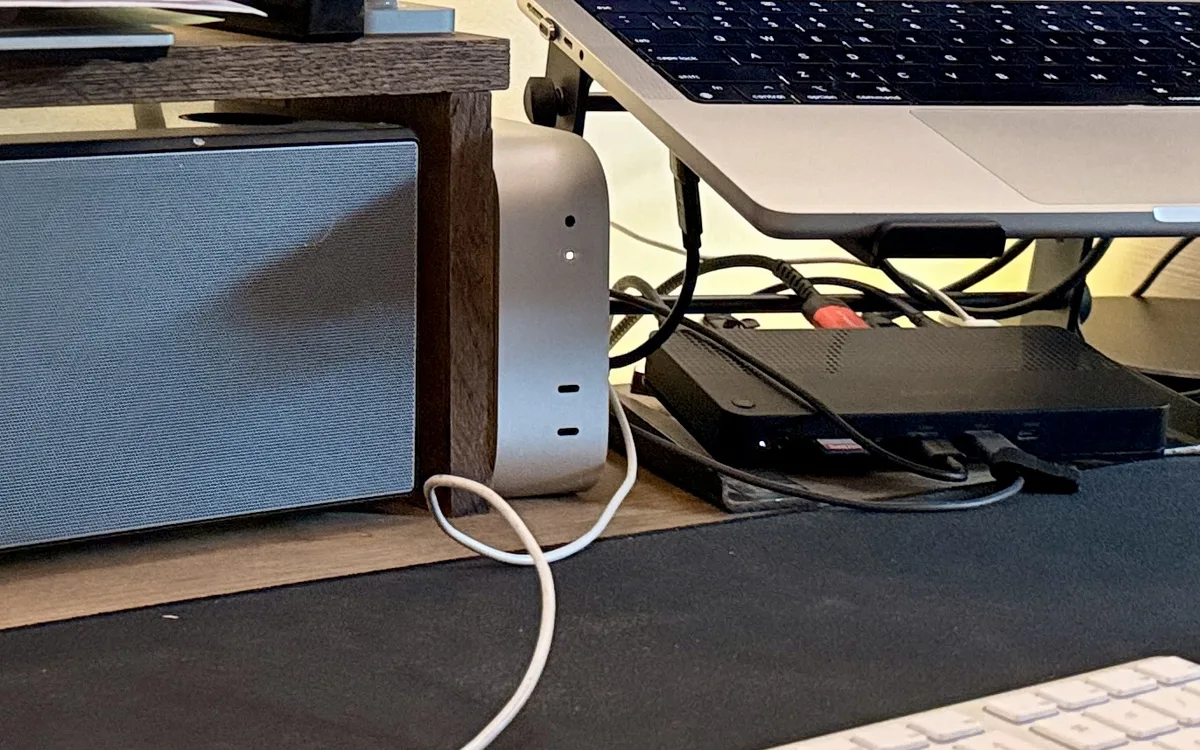
Phase A: at the mini
- Ethernet first. My mini ran on Wi-Fi for half a day before I noticed, with 50 to 100 ms ping inside the flat.
- Account. Same short name as on the laptop, a strong password into your password manager, your Apple ID (it gives you Find My).
- FileVault on. Keep the recovery key in your password manager, not in iCloud.
- Update macOS. My mini shipped with macOS 27.0 while the laptop ran 26. Keep both on the same major version before you move jobs that share code.
- Sharing. Remote Login on for your user only, with “Allow full disk access for remote users”. Screen Sharing on. In Remote Management: only your user, Observe and Control ticked, “VNC viewers may control screen with password” off.
- Passwordless sudo, so setup can run over SSH. It’s a trade-off, delete it after setup if you don’t want it:
echo "$USER ALL=(ALL) NOPASSWD: ALL" | sudo tee /etc/sudoers.d/automation \
&& sudo chmod 440 /etc/sudoers.d/automation && sudo visudo -c- iCloud off for Desktop and Documents, Photos and Messages. Do Not Disturb on.
Phase B: from the laptop
1. SSH key. Test that the name resolves first. My first ssh-copy-id hung with no error, because the name I typed didn’t exist.
nc -z my-mini.local 22
ssh-copy-id -i ~/.ssh/id_ed25519_mini.pub mini
ssh -o BatchMode=yes mini true    # check: no password asked
2. Secrets. Copy ~/.env without the Anthropic key:
grep -v '^ANTHROPIC_API_KEY=' ~/.env | ssh mini 'cat > ~/.env && chmod 600 ~/.env'3. Server settings. No sleep, restart after a power cut, wake on LAN:
sudo pmset -a sleep 0 disksleep 0 displaysleep 10 powernap 0 womp 1 autorestart 1
sudo systemsetup -setrestartfreeze on
sudo scutil --set HostName my-mini
pmset -g | grep -E '^ *sleep'    # check: sleep 0
4. Updates: download, don’t install. In System Settings › General › Software Update › Automatic Updates, turn off “Install Security Responses and system files”. With FileVault on, an unattended update restart stops all jobs.
5. Hardening. Firewall on with stealth mode, SSH with keys only, Spotlight off on the data volume. 10-root.sh in the repo does steps 3 to 5 with a check per line.
6. Toolchain. Command Line Tools, Homebrew, Node, Python with its certificates. Then make sure python3 is the one you installed:
which python3 # check: the Python your jobs use, not /opt/homebrew/bin7. Tailscale for access from anywhere, with no open ports. Sign in with a personal identity to a tailnet you own. Disable key expiry for the mini in the admin console, and put its 100.x IP in ~/.ssh/config.
8. GitHub and repos. gh auth login, then clone all repos to the same paths as on the laptop. Find them with no depth limit:
find ~/ai ~/.claude -name .git -type d -prune | wc -l9. Claude Code login. Open Screen Sharing, run claude in a Terminal on the mini and /login there. Then test it with a LaunchAgent that asks Claude one question. That’s the test that counts.
10. Remote Control (optional), to start a session on the mini from my phone. Trust the folder once in the GUI (claude, Yes, /exit), then run claude remote-control as a LaunchAgent with --capacity 2.
11. Chrome profiles. One profile per platform account, logged in fresh on the mini through each job’s own --login command. Don’t sign in to Chrome itself.
12. Move jobs in waves. Read-only jobs first, then browser jobs, then Claude Code jobs, senders last. Before each move, run the job’s dry run on the mini with the environment its wrapper loads (set -a; . ~/.env; set +a). After each batch, check launchctl list on both Macs.
After a restart
With FileVault on, a restart stops at the unlock screen and the jobs wait. On day one my mini restarted at about 14:15, cause unknown, and sat idle until I logged in at 14:20.
For planned restarts use sudo fdesetup authrestart, which comes back logged in. For the rest you choose: FileVault off with automatic login, or FileVault on and a watch on missing runs. I kept FileVault on.
How I know it’s alive
To know it’s alive I use my Control Room. It shows the last run of each job and which Mac ran it, and it flags “Ran on the wrong Mac”. A login check opens each browser profile, and a watch warns me 10 days before a Claude login expires.
The traps I didn’t find in any guide
For the search “mac mini ai agent” I parsed four of the ranking guides: a 2026 setup guide, a Mac mini vs VPS comparison, the 25 agents post and a headless migration story. FileVault, the Keychain and cookies come up zero times. Those three cost me the most hours.
Your Chrome logins don’t move
“all the 4 chrome windows are blank. no url opened.” That was me at 15:49.
Chrome cookies are encrypted with the Keychain of the Mac they were made on, so a copied profile opens logged out. So I logged in by hand on the mini.
Then the login check showed all four profiles OUT. My jobs start Chrome with a mock keychain, so cookies from a normal Chrome login are unreadable for them.
The fix: log in through each job’s own --login command, and keep Chrome sync off in the job profiles.
SSH lies about the Claude login
claude auth status over SSH says “Not logged in”, even after a login in the GUI. Over SSH the login Keychain is locked. A LaunchAgent runs in the logged-in GUI session, so its answer is the real one. The fix for SSH shells came on day two: the remote token, further down.
”ALL PASS” with 14 failures
Check the result, not the summary. The toolchain script counted failures inside a subshell, so 14 failed npm installs still printed ALL PASS.
The same day, a git add across three repos with errors sent to /dev/null staged nothing and reported “nothing to commit”. Now I check a push by asking git what is still unpushed: git rev-list --count @{u}..HEAD must say 0.
Two Macs, one Claude in Chrome
claude -p --chrome connects to the Chrome of my Claude account. With two Macs it found two browsers, couldn’t ask which one, and stopped. Safe, nothing posted, but nothing done either. Each Mac now keeps its own Chrome device id in a local file, and the job picks that one or stops.
Ten more, shorter
| What I believed | What was true |
|---|---|
| Auto-install of security updates is safe | With FileVault on, an unattended restart stops all jobs. Apple’s first Background Security Improvement restarted Macs without asking |
| A script over SSH sees my Terminal’s PATH | It gets /usr/bin:/bin:/usr/sbin:/sbin, so node wasn’t found |
ssh mini '… $x …' splits the words in $x | The mini’s login shell is zsh, which doesn’t. Use ssh mini 'bash -s' <<'EOF' |
python3 is the Python I installed | Homebrew linked a newer one earlier in the PATH, without my packages |
| MagicDNS names work for SSH | Unreliable on macOS Tahoe (tailscale#20890). Use the 100.x IP |
| My work Google account gives me my own tailnet | The company domain already had one, owned by another account |
| A shallow search finds all my repos | 56 more nested repos sat deeper than four folders |
| An empty bash array is safe | macOS bash 3.2 with set -u calls it unbound. One job ran nowhere for 15 minutes |
| A comment after a trailing backslash is harmless | The next line ran as its own command, exit 127 |
| 256 GB is enough | 167 GB free on day one. Buy 512 GB |
Day two: 24 Claude sessions on the laptop, 1 on the mini
Just after midnight I asked Claude: “how many claude session do i have opended on his macbook vs mac mini?” The answer was 24 on the MacBook and 1 on the mini. 21 of them had been reopened together by my terminal’s restore that afternoon.
I thought I was short on disk. I was short on memory. Moving the scheduled jobs fixed the nights. The days were still on the laptop, because an open Claude session is a job too.
Closing a session doesn’t delete it
The conversation stays on disk and claude --resume reopens it. So the cheap fix is to close what sits idle.
A session can also move to the mini: copy its conversation file over and resume it there. It carries the conversation, not your files, so push your work first. A local session can’t move to the cloud.
Start new sessions on the mini
There are two doors. From the Claude app or claude.ai/code I pick the mini as the environment, because Remote Control already runs there as a LaunchAgent. From the terminal, the plain form is one line that opens Claude on the mini in the folder I’m in:
ssh -t mini "cd $PWD && claude"Three things stay behind on the laptop: files you haven’t pushed, your browser, and your screenshots and clipboard.
The plain form has a limit, and it took two fixes to get past it. The first is the token below. The second is the tmux setup after it, which is what I use now.
How to set up the remote token
The terminal door hit the trap from above. Over SSH, claude -p answered “Not logged in · Please run /login”, because SSH can’t open the login Keychain. My scheduled jobs were fine: they run through launchd, and one of them had logged in at 18:19.
The quick fix is a long-lived token that only SSH shells use. Five steps, about three minutes. It gives you the model and nothing else: the mail, calendar and docs connectors and Artifacts stay missing, because their logins sit in the Keychain. For a quick question or a script over SSH, that’s enough.
1. Create the token. From the laptop:
ssh -t mini 'claude setup-token'It prints a link. Open it in your browser, approve, and paste the one-time code back into the terminal. Then it prints the token, one long line that starts with sk-ant-oat01-.
2. Save it on the mini. Copy only the token line, then run:
pbpaste | ssh mini 'umask 077; cat > ~/.claude/ssh-oauth-token'umask 077 makes the file readable by you only.
3. Load it in SSH shells only. Put this in ~/.zshenv on the mini:
if [[ -n $SSH_CONNECTION && -r ~/.claude/ssh-oauth-token ]]; then
  export CLAUDE_CODE_OAUTH_TOKEN="$(<~/.claude/ssh-oauth-token)"
fi
export PATH="$HOME/.local/bin:$PATH"
Desktop sessions, Remote Control and the launchd jobs keep using the Keychain.
4. Test it.
ssh mini 'claude -p "Reply with exactly: ok"' # check: prints ok, exit code 05. Store it and watch it. Keep a copy in your password manager. The token is valid for one year, so it gets its own expiry watch. Mine alerts me 10 days before the end. The token logs in to the Claude subscription. It isn’t the API key, so the rule from above holds: no API billing from the mini.
Two more traps on the way, both mine. I ran the pbpaste line while the clipboard still held that same line, so the token file contained the command. Then I pasted the one-time approval code as opposed to the token. The code goes into the terminal in step 1. The token is what comes out.
Should the mini be my main Claude machine?
With the token in place I asked the next question: “when remote, is there any other disadvantage?” Claude tested a plain SSH session on the mini instead of guessing. The answer was longer than I hoped.
| For running my main sessions on the mini | Against, tested over plain SSH on the morning of 22 November |
|---|---|
| 32 GB of memory against 16 GB, room for the 24 sessions that choked the laptop | Over plain SSH only 4 of my tool servers loaded. Mail, calendar, docs, chat and design connectors were missing, and so were Artifacts. Their logins sit in the Keychain |
| A session keeps running when the laptop lid closes or I travel | A dropped connection kills an SSH session. The mini had no tmux to keep it alive |
| Reachable from the phone through the Claude app | Browser work uses the mini’s Chrome with the mini’s logins, and I can’t see it without Screen Sharing |
| Same username, same folders, next to the jobs | Unpushed work isn’t there. One repo had 24 uncommitted files on the laptop and a different last commit on the mini |
| Frees the laptop for calls | The conversation history stays on the mini, so my resume shortcuts on the laptop don’t list those sessions |
| Screenshots, the clipboard and voice input stay on the laptop. About 30 skills weren’t synced yet |
By the evening the biggest rows of the right column were fixed. A LaunchAgent now starts a tmux server with the desktop login on the mini. A session opened inside it inherits that login, so the Keychain opens. Tested the same day: the connectors and Artifacts loaded, and the session survived a dropped SSH connection.
My shortcut for a new session now opens it there by default. It warns me about uncommitted or unpushed changes in the folder, pulls on the mini when the copy there is clean, and reattaches to a session I left. A second shortcut keeps a session on the laptop. Both scripts and the LaunchAgent are in the repo.
I also tried the third place, a session in the cloud. It lost on three points: one GitHub repo per session, no local skills, and no local tool servers or hooks. So for jobs it’s cloud first. For sessions the cloud isn’t ready for how I work, and they run on the mini.
The split follows the same rule as the jobs: a session runs where its data and its login live.
| Work | Where it fits | Why |
|---|---|---|
| Long runs: research, builds, batch edits | Mac mini | Memory, and it keeps going with the lid closed |
| Five or more sessions in parallel | Mac mini | 32 GB |
| Work from the phone or on the road | Mac mini, through the Claude app | Remote Control runs there |
| Mail, calendar and docs connectors | Mac mini, inside the tmux session | They need the desktop login. Plain SSH doesn’t have it |
| Calls, voice input, screenshots, copy and paste | MacBook | The mic, the screen and the clipboard are there |
| Browser work I want to watch | MacBook | My Chrome, my logins |
| Anything on uncommitted changes | Where the files are | Push first, then move |
| A session in the cloud | Not my default yet | One repo per session, no local skills, no local tool servers or hooks |
Keep the two Macs in sync
Two machines means two copies of my Claude setup. On the morning of 22 November I asked Claude to update one skill on the mini too, and it turned out that nothing kept the two Macs in step. Each kind of install lives in a different place.
| What | Where it lives | Kept in sync? |
|---|---|---|
| Plugins and marketplaces | ~/.claude/settings.json, in my config repo | By hand: commit, then pull on the other Mac. Claude Code installs a missing plugin at its next start |
| My own skills | ~/.claude/skills, in my skills repo | By hand, same way |
| Project skills | Links into the project repos | The links exist on both Macs, the content comes with each repo’s git pull |
Skills installed with npx skills add | ~/.agents/skills, outside git | No |
The drift after one day: 32 skills existed only on the laptop and 2 only on the mini. Both Macs had an uncommitted settings.json. The mini had one uncommitted edit that existed nowhere else.
The manual routine, four steps
This is what Claude ran to bring one repo on the mini up to date without touching my local edit there.
1. Look before you pull. Which branch, and what is uncommitted:
ssh mini 'cd ~/path/to/repo && git branch --show-current && git status --short'2. List what would change.
ssh mini 'cd ~/path/to/repo && git fetch -q origin && git diff --name-only HEAD origin/main'3. Compare the two lists. If no file shows up in both, a fast-forward pull is safe and leaves the local edit alone:
ssh mini 'cd ~/path/to/repo && git pull --ff-only'In my case 8 files came in and the lists didn’t overlap.
4. Test on the mini, not only on the laptop. The skill’s 20 tests passed there too. A green run on one Mac says little about the other: different Python, different paths, different logins.
The automatic routine
Four manual steps per repo don’t survive a busy week. So the same day I added one small sync job. It runs on both Macs at a 15-minute interval, for the config repo and the skills repo only:
- Commit local changes.
git pull --rebase, then push.- Install missing
npxskills from a manifest file in the skills repo. - Remove the skills I uninstalled on the other Mac.
If a rebase conflicts, the job undoes it, pushes nothing and alerts me. It doesn’t guess. Plugins need no step, because Claude Code installs the enabled ones at its next start. The default model and effort setting travel the same way. Install something on either Mac and the other has it within about 15 minutes.
Two limits. The job is less than a day old, so I can’t show its numbers yet. And it’s for config and skills only. Job code doesn’t travel this way: an automatic pull would put untested sender code on the mini within 15 minutes.
It’s also an exception to “one job, one machine”, on purpose: each Mac has to push its own changes. A job stays on one machine when it sends, posts or deploys. Guards and sync run on both.
What I’d do differently
Buy the bigger disk
256 GB works today. Chrome profiles, logs and node_modules grow, and a server with a full disk fails jobs in strange ways.
Plug in the cable before the first boot
Wi-Fi was half a day of slow SSH, and the pre-boot unlock over SSH for FileVault needs Ethernet anyway.
Write the correction down when it happens
I kept one file with what I believed, what was true, the evidence and the fix. 53 rows in one day. This post is fact-checked against that file.
Check the agent, not the command
Claude Code ran most of the commands and wrote most of the scripts. In practice my job was reading its output with suspicion.
Claude Code did the typing. My job was to not believe it when it said ALL PASS.
At 18:56 I wrote to Claude: “Ensure the jobs are indeepndent from the macbook lid closed or not on battery.” Since the first job started on the mini at 16:00, its log shows 65 clean runs, 1 failed and 0 put off. The MacBook hasn’t put off a job since 18:00. That’s day one. I’ll add the 30-day numbers here.
Which of your jobs would stop if your laptop stayed closed for a week?
If you’re making the same call for your team’s automations, that’s the kind of work I do as a fractional CTO.
[Writing time: 2h]