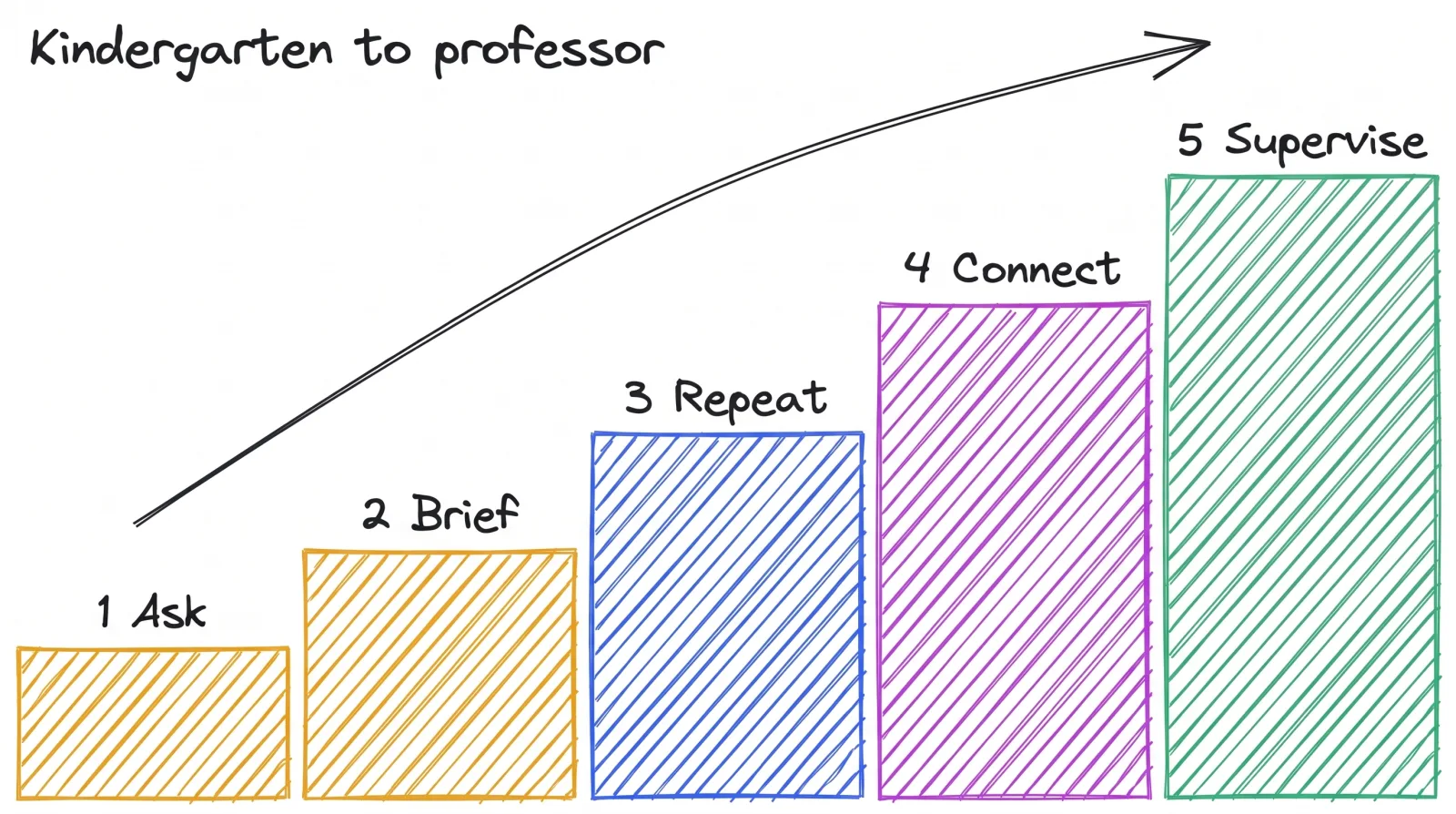
75% of knowledge workers use AI at work, says Microsoft’s 2024 Work Trend Index, a survey of 31,000 people. How well they use it, the survey can’t tell you. I grade it like school. Using AI at work has five levels: ask, brief, repeat, connect and supervise, from kindergarten to professor.
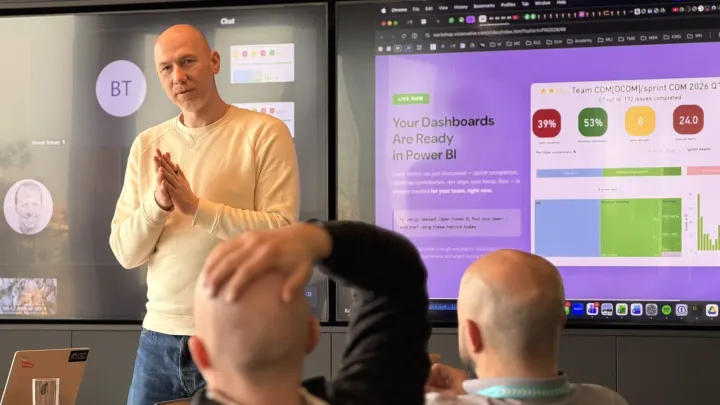
On 11 November 2026 I opened a workshop day for the IT department of one company. 25% of the room were developers. The other 75% were support, helpdesk and admins. So it wasn’t going to be a developer talk.
I started with three questions. Who used AI this week? Who used it for work? Who used it for a task that took more than 30 minutes before?
Answer them for yourself before you read on.
The room left with two things: a routine for each week, and a semaphore with three colours, green, orange and red. Which colour you show is your own choice. I’ll get to both.
Daily use says nothing about your level
In the same Microsoft survey, 78% of the people who use AI at work bring their own tools. They opened a chat window on their own, which is a fine start. It also means their only teacher is habit.
My demo for this is one helpdesk ticket: a handheld scanner that won’t connect to Wi-Fi after an update. The ticket is fictional, I don’t put a client’s tickets on a screen.
The first prompt is one line: a user says the scanner doesn’t connect, what should I do? The second prompt pastes the ticket and the internal guide and asks for a reply to the shift leader in five sentences.
I timed both when I prepared the talk. The one-liner took 7.1 seconds and returned a generic checklist. The briefed one took 6.7 seconds and named the device, the cause and the next step. The better answer wasn’t slower, it only needed two pasted files.
Both prompts count as “I used AI today”. One is kindergarten and the other is a grade higher.
I brought two company stories to the room as well. A leader of one European tech company told me their delivery got close to 80% faster with AI in software development, in Java and in SAP. I didn’t measure it, so take it as their claim. The number I can show data for is in Spec-Driven Development in SAP: From 19 Days to 5.5.
At one global tech company everyone works with Claude Desktop, it’s expected from each employee in each department. Once it’s expected from all of them, the question in the corridor changes from whether you use AI to how you use it.
Comparing how is the useful conversation, and it needs a scale.
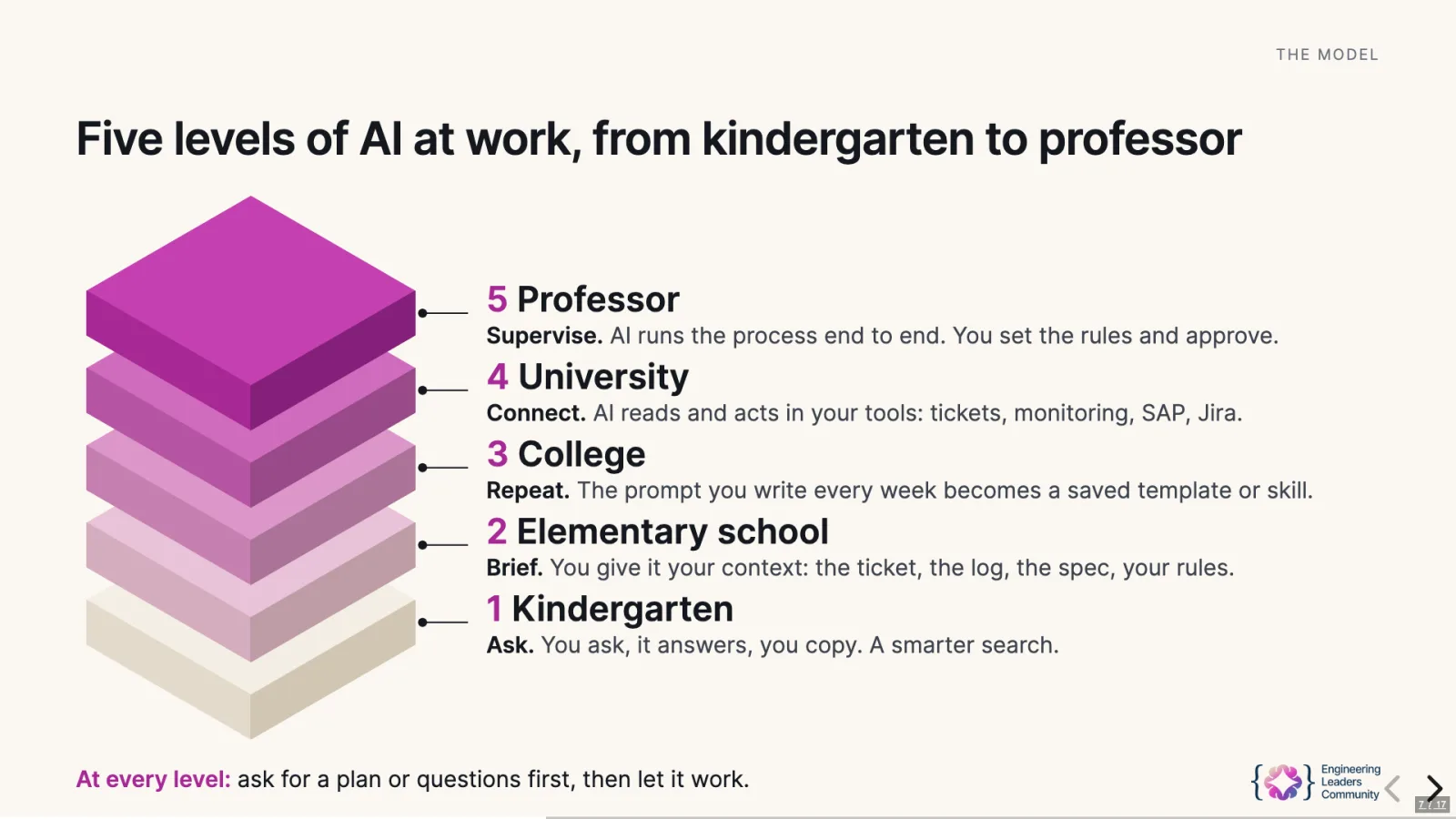
The five levels, from kindergarten to professor
Like in school, you pass one grade and then the next one.
| Level | School | What you do | The move that gets you there |
|---|---|---|---|
| 1 | Kindergarten | Ask. You ask, it answers, you copy. A smarter search. | Open the company AI account and ask one work question today. |
| 2 | Elementary school | Brief. You give it your context: the ticket, the log, the spec, your rules. | Paste the error, the log, the ticket. Say who the answer is for. |
| 3 | College | Repeat. The prompt you write each week becomes a saved template or skill. | The third time you write the same prompt, save it. |
| 4 | University | Connect. AI reads and acts in your tools: tickets, monitoring, the repository, SAP. | Connect one tool, with IT approval. |
| 5 | Professor | Supervise. AI runs the process end to end. You set the rules and approve. | Write the rules and the check: what AI may do alone, what a person approves. |
The catch is, your level is per task, as opposed to per person. You can be at university for code review and in kindergarten for meeting notes.
One habit works on all five levels: ask for a plan or for questions first, then let it work.
Your role is on all five levels
Three quarters of that room don’t write code, so I’ll start with them.
Support and helpdesk
| Level | What it looks like |
|---|---|
| 1 Ask | ”Rewrite this answer so a colleague outside IT understands it.” |
| 2 Brief | Paste the ticket and the knowledge-base article. Get a reply draft. |
| 3 Repeat | Saved prompts: ticket summary, standard replies, shift handover. |
| 4 Connect | AI reads the queue. It suggests category, priority and duplicates. |
| 5 Supervise | AI solves how-to tickets. Access rights and money go to a person. |
Admins
| Level | What it looks like |
|---|---|
| 1 Ask | ”What does this PowerShell command do before I run it?“ |
| 2 Brief | Paste the log and the config. Ask for three causes and how to check each. |
| 3 Repeat | Runbooks as saved prompts: laptop setup, patch night, incident write-up. |
| 4 Connect | AI reads monitoring and logs and builds the incident timeline. |
| 5 Supervise | AI runs nightly checks and fixes from an approved list. You approve the rest. |
Developers and everyone else
A developer climbs the same stairs. It starts with “explain this stack trace”. Next comes the spec and the class, pasted in with a request for a plan.
Then a team rules file with saved skills for code review and unit tests. Then AI reads the repository and the test results on its own. At the top AI drafts the change and a person approves the release.
For everyone else it starts before the ticket: ask “Excel shows #REF!, why?” first. At the top it’s one sentence, “new colleague starts Monday”, and the access, the laptop and the accounts get requested while you confirm. All four roles are side by side on slides 8 to 12 of the deck.
Support is also where the best measurement exists. Erik Brynjolfsson, Danielle Li and Lindsey Raymond followed 5,179 customer support agents who got an AI assistant, in NBER working paper 31161 (2023), later published in the Quarterly Journal of Economics in 2025. Issues resolved per hour went up 14% on average, and 34% for novice and low-skilled agents.
With the assistant, agents two months into the job worked like agents six months in without it. The most experienced agents gained close to nothing. Keep that last sentence in mind for the next section.
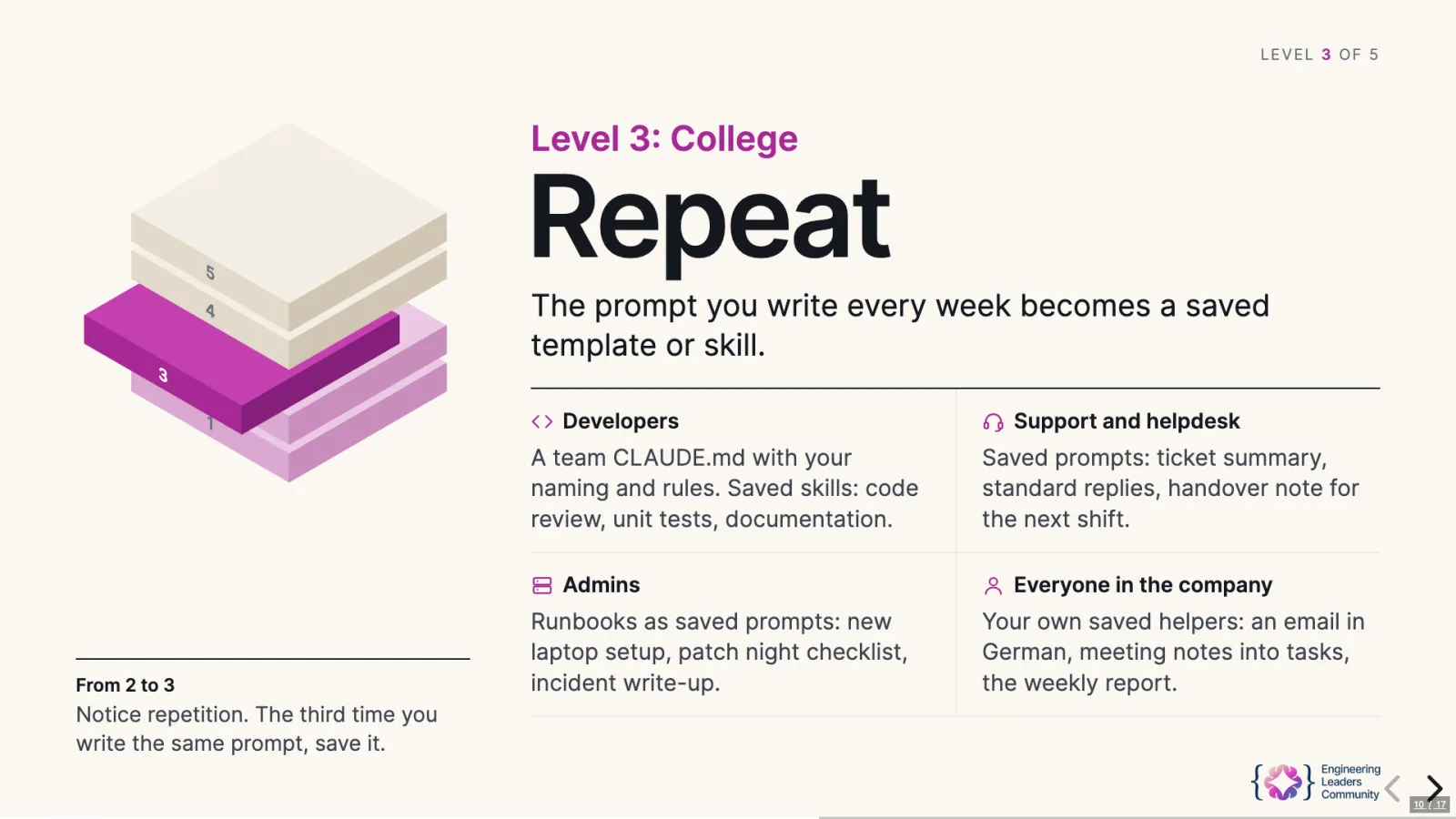
In an SAP team the rows for levels 4 and 5 get specific: the DEV system, ATC findings, ABAP Unit runs. The slides of a full SAP workshop day, 73 of them, go through it prompt by prompt.
”AI made developers 19% slower” was measured, and I believe it
The strongest number against all this comes from METR. In 2025 they gave 16 experienced open-source developers 246 real tasks in their own repositories. With AI tools allowed, the tasks took 19% longer.
METR has since marked it out of date. In their 2026 follow-up developers increasingly declined to take part, because they didn’t want to work without AI. I still use the 2025 result, for two reasons.
First, these were experts on code they knew by heart. That’s the same group that gained close to nothing in the support study. AI pays the most where you’re the novice, or where the task repeats.
Second, the same developers believed AI had made them 20% faster. They felt faster and they were slower. Which is why the homework from my talk ends with a number you write down.
My professor month: 1,023 messages for 5.5 hours of my time
I’m at level 5 in my outreach. In October 2026 the automation sent 1,023 messages for me: 577 emails, 256 LinkedIn invites, 151 LinkedIn messages, 27 InMails and 12 others. The counts come from my outreach ledger.
The pipeline has six steps. It finds the people, writes the message, checks it and sends it, follows up and logs it all to the CRM. My step sits in the middle: I set the rules, and each morning I can veto the list.
By hand, it would be about 52 hours of work. I break my own rule here: I didn’t time 1,023 messages by hand, so the 52 hours is a calculation. 5 minutes per first email, 2 per follow-up, 3 per LinkedIn message, 4 per InMail, 1 per invite. My own time was about 5.5 hours, 15 minutes a day.
So roughly one working week came back to me in October, together with 24 replies and 9 booked calls.
Level 5 is not zero work. Somebody has to own the rules and the veto, and in my case it’s me.
Outreach is my process, yours will look different. The shape stays: for a helpdesk it’s the how-to tickets solved end to end, with access rights and money left to a person.
The room left with a weekly routine and no excuses
The outcome of that day was, nobody in the room has a reason to find excuses why not to move forward with AI. Each week they have three things to do, and a fourth one when it works.
Summarize what you worked on
Write down what you’ve been working on this week. Without it you can’t see your own work from above.
Identify the repetitive tasks
Look at the summary and mark what repeats: a reply you keep writing, a log you keep reading, a report you keep building. Those are the tasks you can automate, or ask AI to help you to automate.
This is how you move from level 2 to level 3. The third time you write the same prompt, save it.
Find the true use case and tell your manager
Pick the one use case you’ll really automate, and inform your direct manager that you do it.
Do it one level higher than last week, and write down the minutes before and after. Remember the developers who felt 20% faster.
If it works, share the skill
Share it with the other people in your role. You build your own AI awareness that way, and you’re vocal about it inside the company.
Why be vocal? From what I see in the companies I work with, the people known for this are the ones I’d expect to survive the next wave of layoffs.
That routine is personal. A company has its own five levels, and the ELC 5 Levels of AI Adoption describe those for an engineering organisation, with the KPIs that prove each level. If you’re the CTO who has to show results from the company side, that pressure has a pattern, and moving a whole department up is what I do as a fractional CTO.
Green, orange or red: the colour is your choice
What I was saying in the room is, each and every company will go through some sort of optimization. It’s just a question of time. I’d even say there will be several waves of it.
When the wave comes, you’re already signaling on the semaphore, the traffic light. It has three colours.
| Colour | What you signal |
|---|---|
| Green | We are compatible. |
| Orange | There is potential, we can make it work. Let’s give it another 3 months with very specific KPIs. If the KPIs are met, you move to green. |
| Red | We are not compatible. |
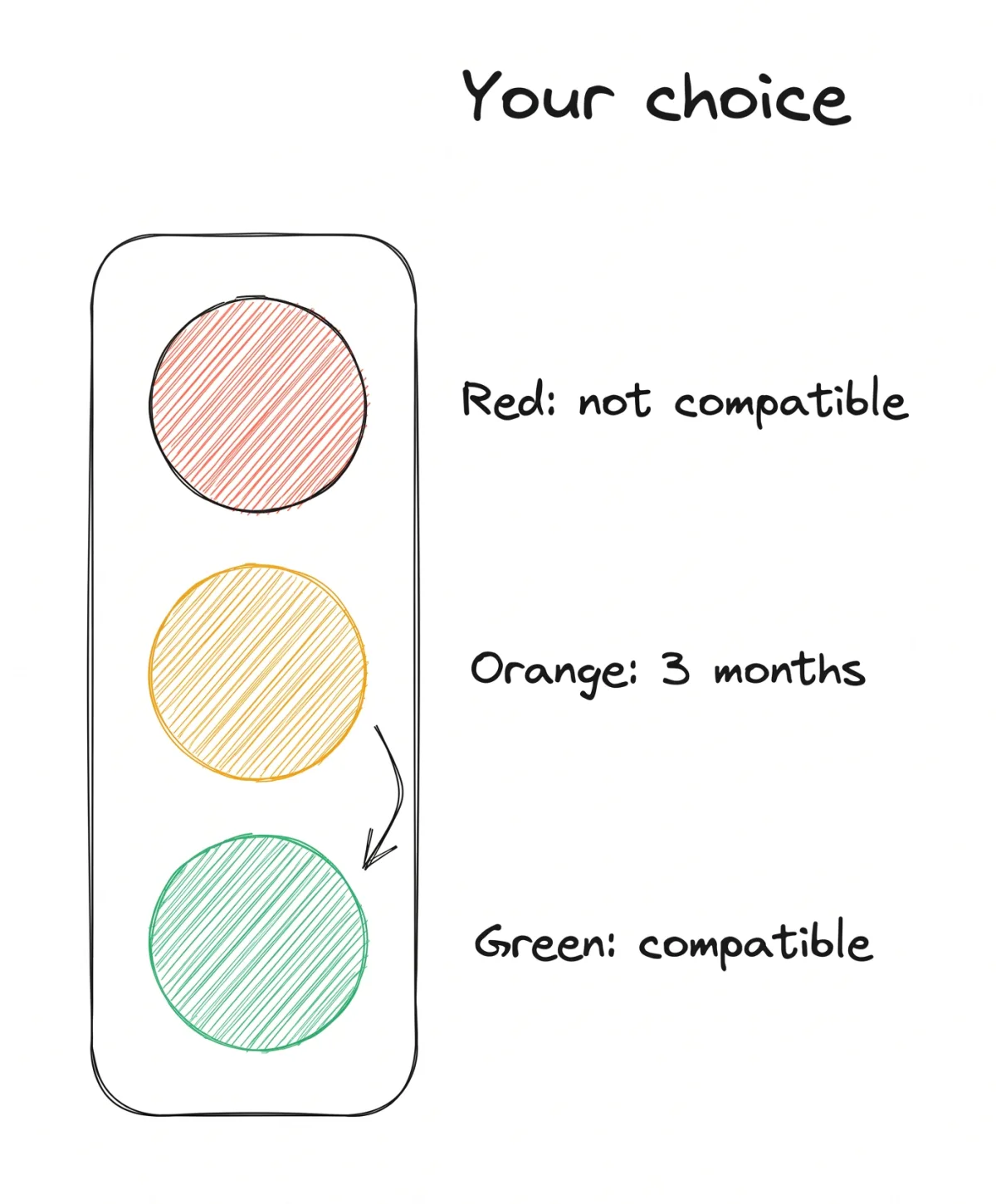
What colour you are on the semaphore is your personal choice. Either you invest even a little bit of time into it, or you ignore it totally. You do everything the old way, you go back home and you just watch Netflix.
Then don’t be surprised about what’s going to happen with you and with your career. Some people answer with resistance anyway, and I wrote about what that does to a team.
My slide for this had four sentences on it:
Run experiments. Play with Claude. Otherwise you will not be needed in the future. It is your own choice.
What colour were you last week?